
Final Countdown - Day Timer1.7.1 - App Store
You'll be able to see results in few seconds.
Publisher Description
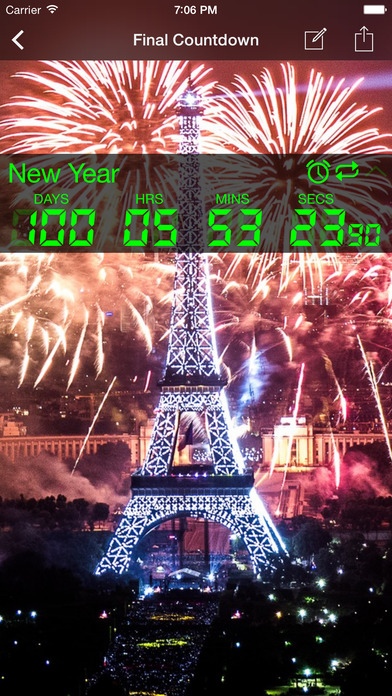
Features:
3D Touch on iPhone 6s and 6s Plus
Shows calendar days, hours, minutes and seconds, milliseconds!
Share live personalized countdowns across mobile platforms
Calendar and Facebook birthday Import
Cloud Backup using Facebook login
Sync countdowns across devices
Facebook App invites to unlock features
Recurring repeating calendar events (daily, weekly, monthly, yearly)
Widgets
Share live personalized countdowns across mobile platforms share countdown through Facebook, Twitter, Whatsapp, Google+, Instagram, Kik, Vine, Tumblr, Sina Weibo, text sms, email
Customizable HD skins. Allows you to design your own widget skins
Choose own background image!
You can also Count Up from a point in time!
12 widget skins preloaded
Supports multiple events as many as will create
Low CPU/Battery usage
Reminder and to-do alerts
Custom alarm ringtones
See others share their tweeted events on http://www.fncd.net
Automatically accounts for Timezone and Daylight Savings Time changes.
App Description:
The only free countdown app to have a multi event widgets. You can also see the milliseconds roll off fast to your live event. You only live once (yolo), so put a timer on your life and begin living with purpose every day. A free one of kind digital timer to add urgency, excitement, calendar reminders and positive thinking to your life. Down up or Count up. Whatever you want! Fully supports the iPhone 6 and iPhone 6 Plus.
Anticipate to events that you have been looking forward to: Big events, Birthday, New Year, Vacation, Concerts, Military service returns, Baby Due dates, Gender parties, Sporting events, Holiday, Wedding, Anniversary, Season Premiers and Finales, Graduation, to-do, Soccer, Football, Baseball, Basketball games. Never forget another special calendar day to wish your family and friends your loving congrats and best wishes for their special day.
Did you get here by clicking a link such as "fncd.net/v/?id=xxxx"? Install then click the link to have that same exact LIVE countdown. You can also view the live countdown on your phone.
Share your live countdowns with others! Download the Final Countdown app then share with others to have the same countdown on their device!
Going on a trip with friends or family..how about setting up a countdown with a sweet background image then just simply share so all will be in sync with the time left to the big trip.
After you installed Final Countdown, go to http://www.fncd.net to add the latest countdown we are sharing.
In life, there is no pause button, no rewind, no fast forward...Live each day with purpose!
Follow us on:
YouTube https://www.youtube.com/channel/UCxSSu-1vJtHm9moEUeghzbQ
Twitter https://twitter.com/TheCountDownApp
Facebook https://www.facebook.com/games/hdn-countdown/
Instagram http://instagram.com/thecountdownapp/
Requires iOS 8.0 or later. Compatible with iPhone, iPad, and iPod touch.
About Final Countdown - Day Timer
The company that develops Final Countdown - Day Timer is THANGBOM LLC. The latest version released by its developer is 1.7.1.
To install Final Countdown - Day Timer on your iOS device, just click the green Continue To App button above to start the installation process. The app is listed on our website since 2014-10-10 and was downloaded 0 times. We have already checked if the download link is safe, however for your own protection we recommend that you scan the downloaded app with your antivirus. Your antivirus may detect the Final Countdown - Day Timer as malware if the download link is broken.
How to install Final Countdown - Day Timer on your iOS device:
- Click on the Continue To App button on our website. This will redirect you to the App Store.
- Once the Final Countdown - Day Timer is shown in the iTunes listing of your iOS device, you can start its download and installation. Tap on the GET button to the right of the app to start downloading it.
- If you are not logged-in the iOS appstore app, you'll be prompted for your your Apple ID and/or password.
- After Final Countdown - Day Timer is downloaded, you'll see an INSTALL button to the right. Tap on it to start the actual installation of the iOS app.
- Once installation is finished you can tap on the OPEN button to start it. Its icon will also be added to your device home screen.
Program Details
System requirements
Download information
Pricing
Version History
version 1.7.1
posted on 2014-10-10
Disclaimer
Official App Store Link
We do not host Final Countdown - Day Timer on our servers. We did not scan it for viruses, adware, spyware or other type of malware. This app is hosted by Apple and passed their terms and conditions to be listed there. We recommend caution when installing it.
The App Store link for Final Countdown - Day Timer is provided to you by apps112.com without any warranties, representations or guarantees of any kind, so access it at your own risk.
If you have questions regarding this particular app contact the publisher directly. For questions about the functionalities of apps112.com contact us.
